Export your workspace data
Download your contacts, accounts, invoices, payments, and time entries as CSV files in one zip.
A data export gives you a copy of your workspace records as spreadsheet files. Use it for your own backup, for your accountant, or to work with your data in another tool.
The export is one zip file with a CSV file for each kind of record, including your contacts, accounts, invoices, payments, and time entries. Every record is included, whoever it is assigned to. Files you uploaded to Agiled are not included.
Only the workspace owner can export.
Export your workspace
- Open Settings › Data export.
- Select Export workspace.
- Wait for the export to finish. You can leave the page while it runs. Large workspaces can take a few minutes.
- When it shows Ready, select Download.
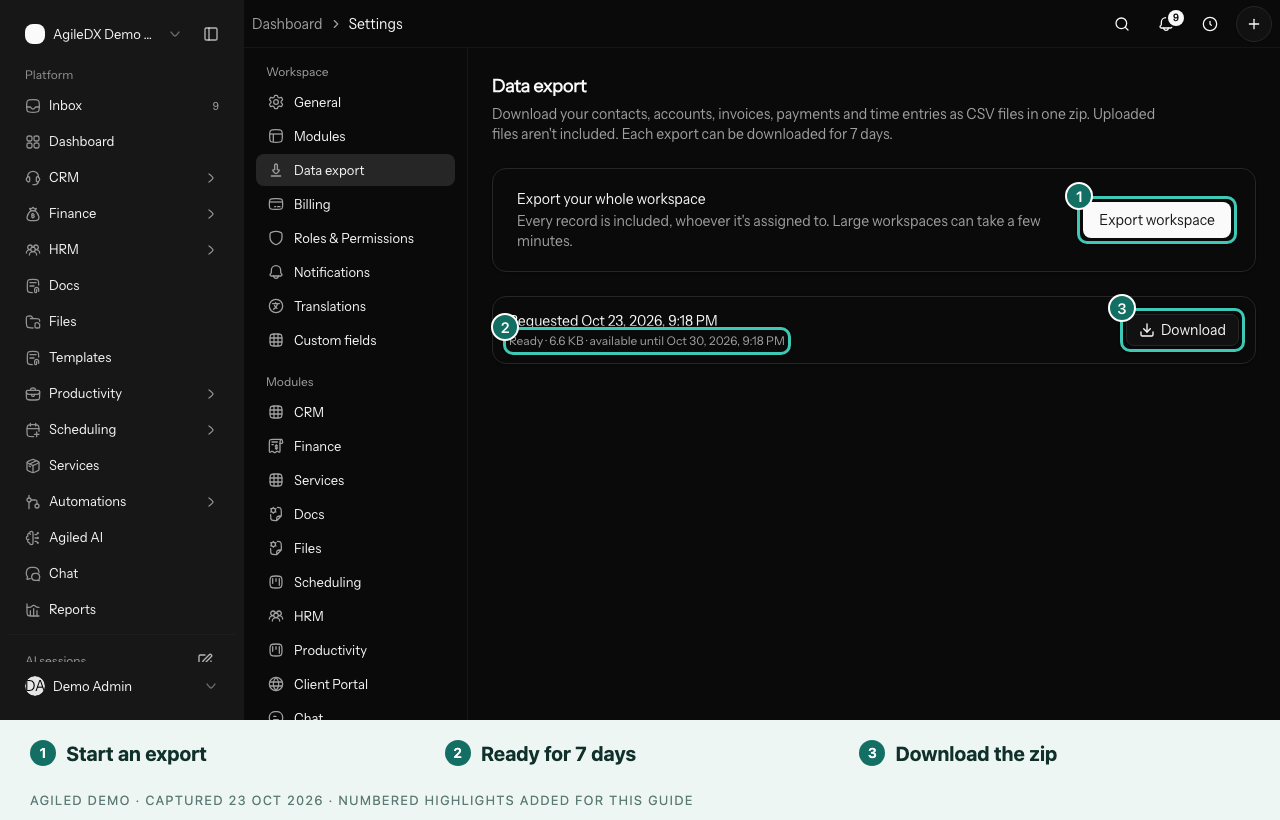
You're done when the zip file is in your downloads. Each export shows when you requested it, its size, and the date it is available until.
Good to know
- Downloads last 7 days. After that, start a new export.
- One at a time. If you select Export workspace while an export is still running, you get the same export rather than a second one.
- CSV opens anywhere. Open the files in Excel, Google Sheets, Numbers, or any spreadsheet app.
- Uploaded files stay in Agiled. To keep copies of uploaded files, download them from Files or from each record.
Export one list instead
To export only part of your data, such as a filtered list of contacts, use the export option on that list. See Contacts.