Service Pricing
Set service prices, recurring billing cycles, plan tiers, and checkout tax settings.
Open a service from Services > All Services, then select Pricing.
Price and Currency
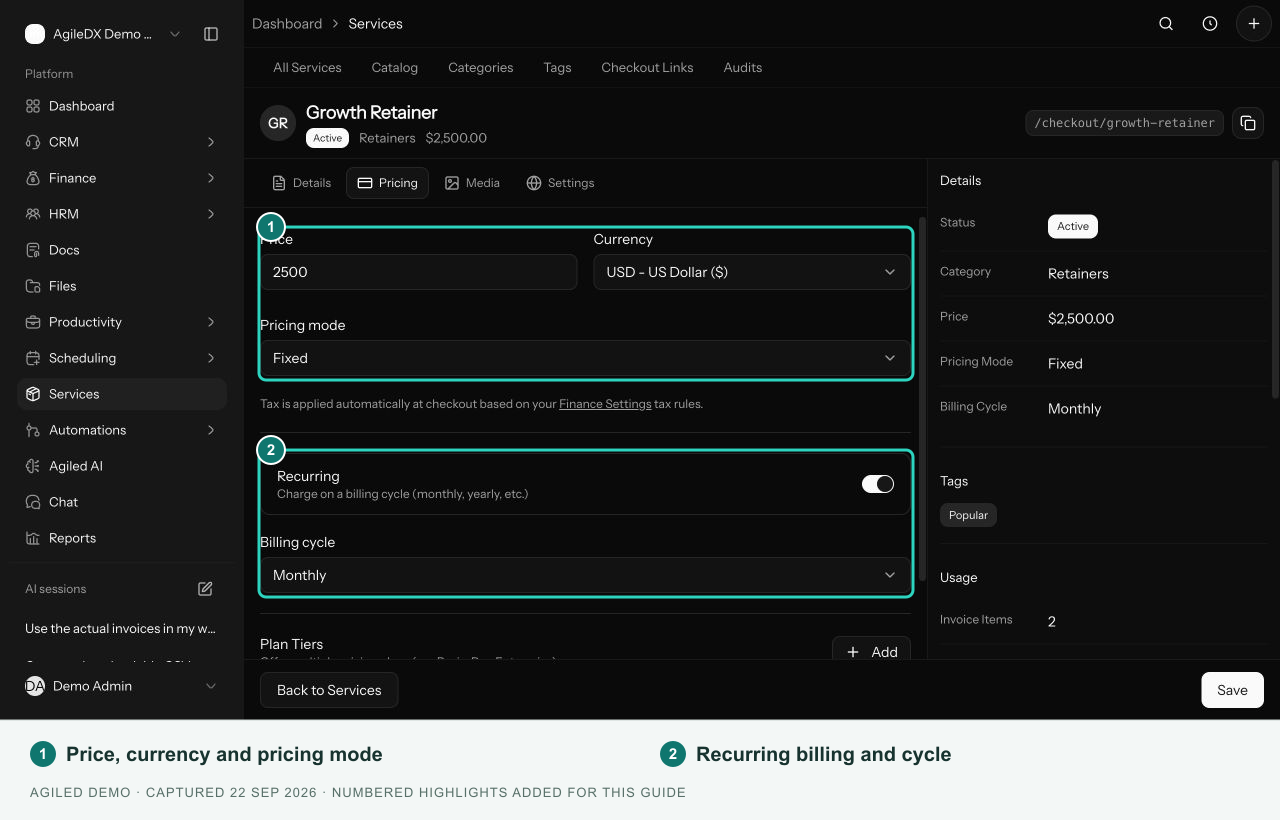
Set Price, Currency, and Pricing mode, then select Save. Use the available pricing mode that matches the offer. Review the public checkout before sharing the link so you can confirm the amount customers see.
The current setup screen does not expose separate minimum-price, maximum-price, product-tax, or product-discount inputs.
Recurring Services
Turn on Recurring to choose a Billing cycle. Turn it off for a one-time offer. A service's pricing configuration is separate from a recurring invoice template; use recurring invoices when you need scheduled invoice generation.
Plan Tiers
Select Add beside Plan Tiers. Enter each plan's name and price. For a recurring service, you can also choose the plan's billing cycle. Use Mark as popular for the plan you want to highlight, or the remove action to delete an unwanted tier. These are form controls; you do not need to enter JSON.
Taxes and Existing Documents
The Pricing tab links to Finance Settings for checkout tax rules. Review taxes and discounts on invoices and estimates in their own editors.
Changing a service does not mean an existing invoice or estimate has changed. Review documents that already contain copied line-item details separately.