Create a Custom AI Worker
Configure a worker brief, availability, tool access, and approval policy.
A custom worker combines reusable instructions with tool access and an approval policy. Open Agiled AI > Workers > New worker.
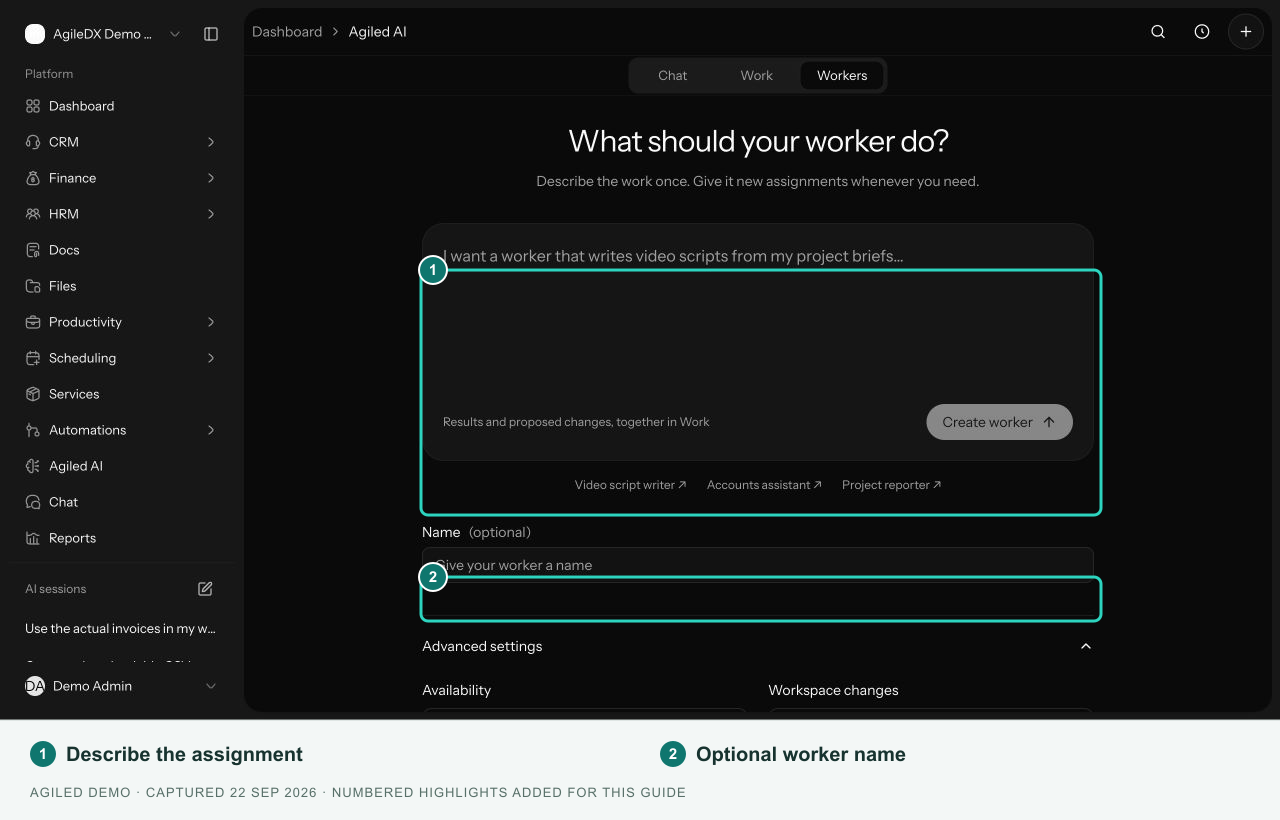
Describe the job
Enter the worker's purpose in What should your worker do?. Specify the expected deliverable, source records, and review requirements. The Name is optional; Agiled can derive it from your instructions.
The example prompts can help you start a video script writer, accounts assistant, or project reporter. Edit the instructions to fit your process before creating the worker.
Advanced settings
Expand Advanced settings to configure:
| Setting | Choices |
|---|---|
| Availability | Ready for assignments, Draft, or Paused |
| Workspace changes | Ask me before making changes, or Read and prepare files only |
| Tools & access | The workspace areas the worker may use |
| Choose individual tools | Search and select tools within enabled areas |
Your account permissions still apply. Files and calculations are included with every worker. Selecting an area does not grant your account access to records it could not otherwise use.
All tools in enabled areas allows the tools in your selected categories. Clear that option and select individual tools when the job needs a smaller set. In read-only mode, the list shows read tools.
The current form creates deliverable-based workers. It does not expose the old Task comment output selector, context-source selector, or max-iterations field.
Start work
Select Create worker, then give the saved worker a specific assignment. A worker set to Draft or Paused must be changed to Ready for assignments to enable its assignment composer.
Review the first assignment's files and proposed changes before reusing the worker for further work.