Guides
Sell a package online
For fixed-price services clients can buy and pay for straight away, such as audits, sessions or set packages.
This guide is for you if some of what you sell has a fixed price and a clear result, so clients can just buy it: a website audit, a branding package, a photo session, a 3-session coaching bundle.
By the end, you'll have a checkout link for one service. A client opens it, answers a few questions, pays, and their project is created for you.
What guided setup already made
If you chose Clients purchase directly or Products or fixed packages in guided setup, your services are already in Services with the names you gave.
Steps
- Choose how clients pay you. Connect an online payment provider such as Stripe in Settings › Finance. Online checkout needs one.
- Open the service. Open Services and select the package, or select New Service and enter its name, price and currency.
- Describe it. Fill in Details, Pricing and Media, so buyers know exactly what they get.
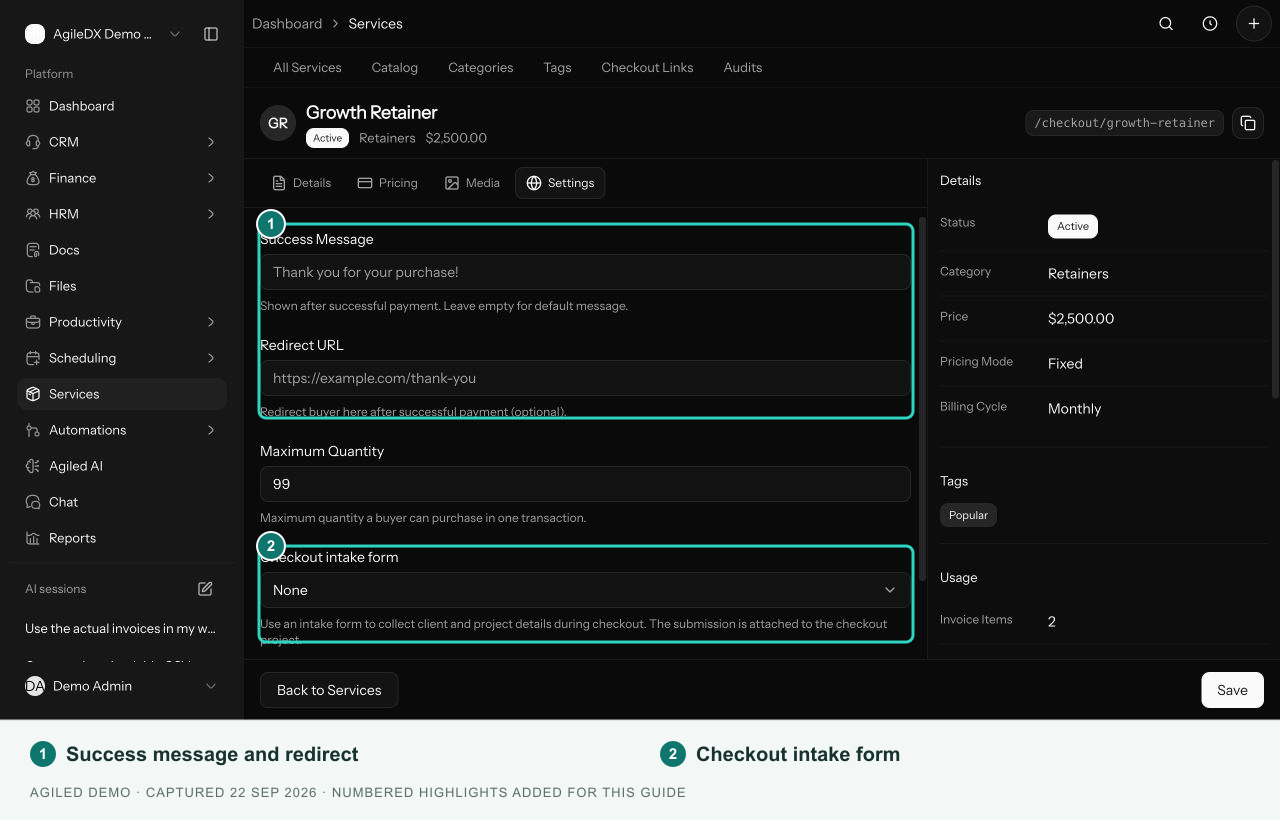
- Set what happens at checkout. Open the service's Settings. Pick the questions buyers answer and turn on creating a project after purchase. Select Save.
- Copy the link. Select Copy checkout link at the top of the service, and add it to your website, social posts or emails.
- Buy it yourself once. Open the link in a private browser window and go through checkout, so you see what buyers see.
You're done when your checkout link shows the right package and price and takes you to payment.
Good to know
- After someone buys, you get their contact, their answers and, if you turned it on, a new project. See Sell a service online.
- Sell the same package in a proposal too. Services you create here can be added to invoices, estimates and Smart Flows in one click.
When this is working
- Welcome buyers with an onboarding Smart Flow that collects their files.
- Let buyers book their session straight after paying.