Reports
Project Profitability Report
Compare what each project earned from billable time with its labor cost and expenses.
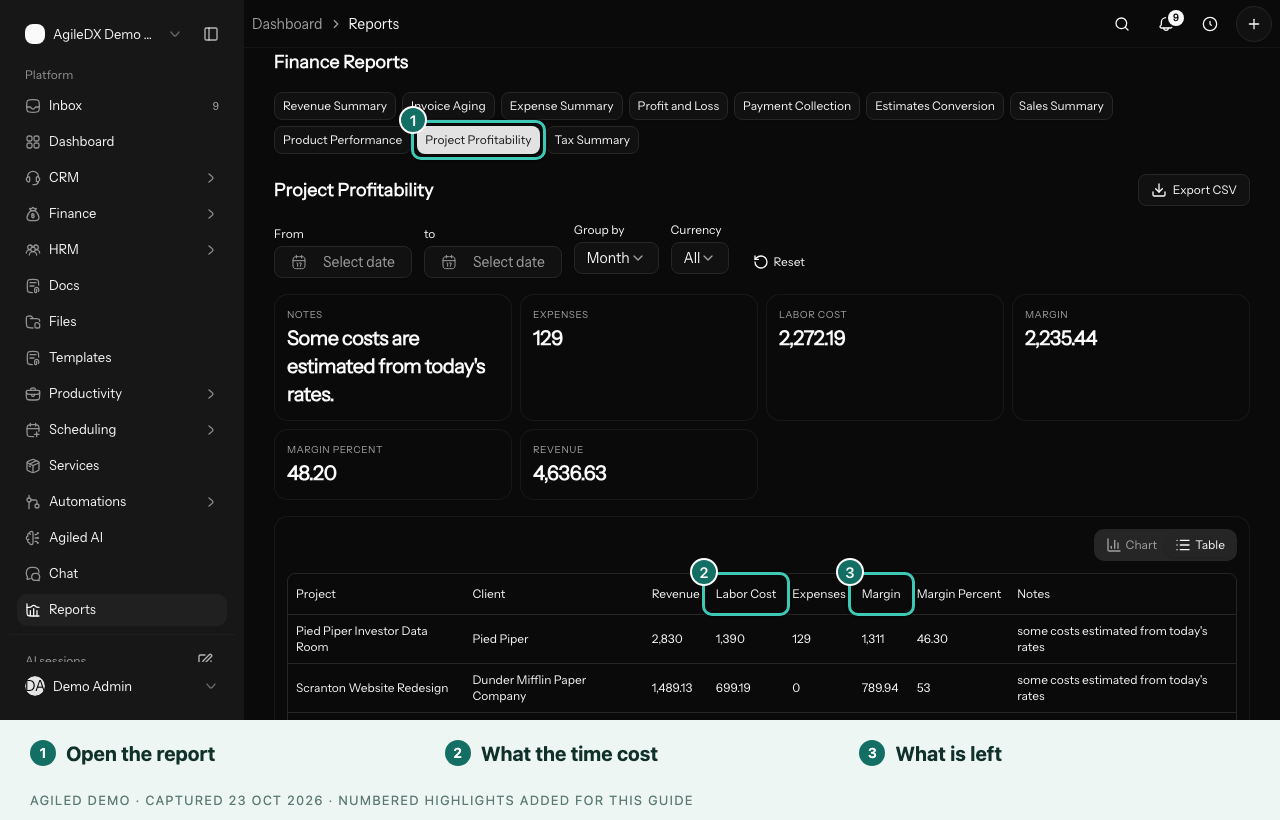
Project Profitability lists every project with the revenue from its billable time, what the time cost you in labor, its expenses and the margin left over. A second table adds it up per client.
Before You Start
Labor cost comes from each person's cost per hour. Set it in Settings > Productivity, under Team costs and capacity. See Profit, Utilization and Capacity.
Open the Report
- Open Reports > Finance.
- Select Project Profitability.
- Set From and To. The report starts with the last three months.
Read the Report
| Column | What it shows |
|---|---|
| Project and Client | The project and the client it belongs to |
| Revenue | Billable time logged in the period, at its billable rates |
| Labor Cost | All time logged, billable or not, at each person's cost rate |
| Expenses | The project's expenses, except rejected ones |
| Margin | Revenue minus labor cost and expenses |
| Margin Percent | Margin as a share of revenue |
| Notes | Anything that makes the margin less exact |
Revenue here is the value of billable time, not invoices or payments. It tells you whether the work itself is profitable, even before you bill it.
Notes to Look Out For
- "No cost rate counted as free": someone logged time before they had a cost rate. That time adds no labor cost, so the margin looks better than it is. Add their cost rate to fix future time.
- "Some costs estimated from today's rates": older time was logged before cost rates were saved with each entry, so it is costed at the person's current rate.
- Expenses in other currencies are left out, so totals aren't mixed.
Who Can See It
The report is for people who manage finance, because it shows cost rates and margins. Others don't see it in the report list.