Finance
Payment Reminders
Remind clients about invoices before and after the due date, starting from a recommended set of rules.
Payment reminders email your client about an unpaid invoice at the times you choose, before or after the due date. They save you from chasing every invoice by hand.
Start With the Recommended Reminders
If you have no reminder rules yet, Agiled suggests a set that works for most businesses:
- 3 days before the due date;
- on the due date;
- 7 days after the due date.
To use them:
- Open Settings > Finance and stay on the Invoices tab.
- Scroll to Invoice Automation > Payment Reminders.
- Select Use recommended reminders.
- Review the three rules and change any timing you like.
- Select Save Settings.
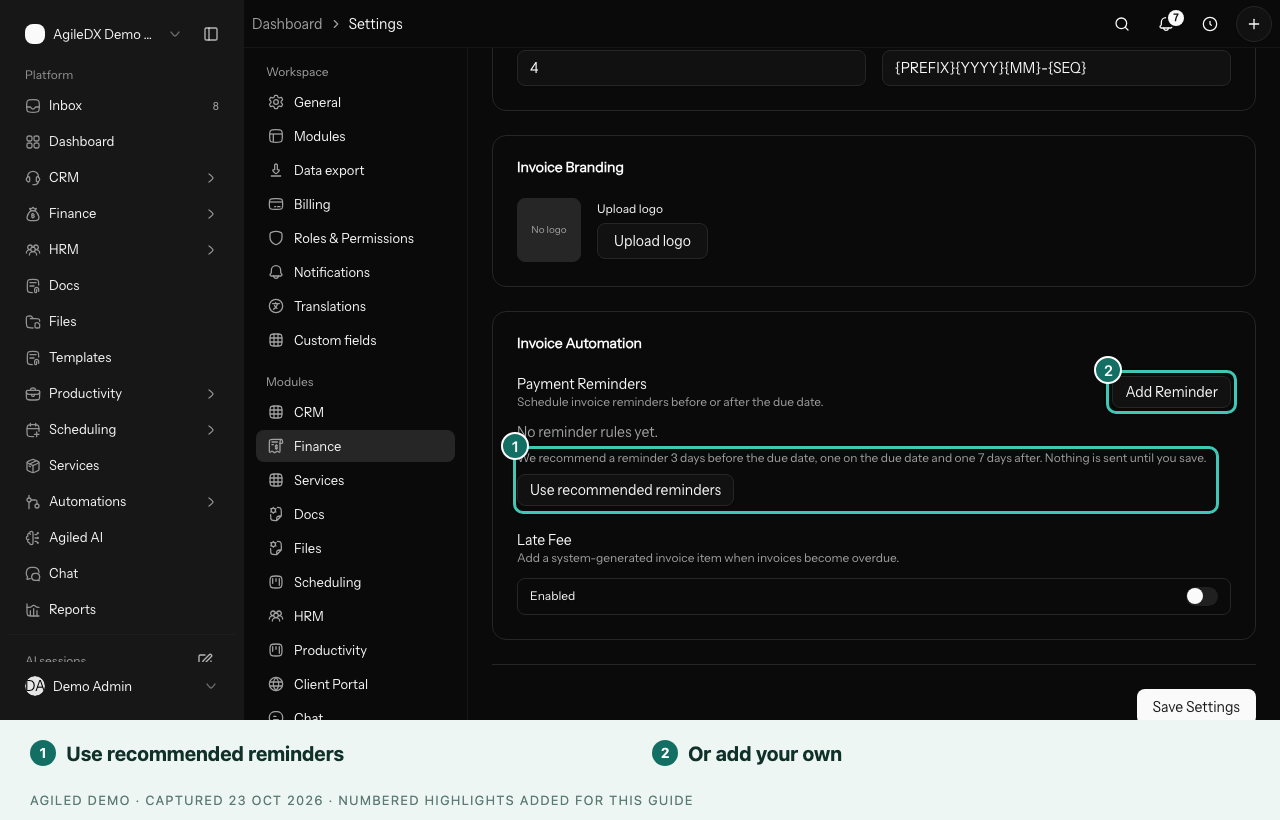
Nothing is sent until you save.
Add Your Own Reminder
- In Payment Reminders, select Add Reminder.
- Choose how many days before or after the due date it should go out, or send it on the due date.
- Select Save Settings.
Good to Know
- Reminders are for unpaid invoices. Once an invoice is paid, no more reminders go out for it.
- If a client pays by bank transfer and tells you, confirm the payment promptly so they don't get a reminder for money they've already sent. See Get Paid by Bank Transfer.
- For an invoice with a payment schedule, the due date is the date of the last payment. See Deposits and Payment Schedules.
- Late fees are set up in the same Invoice Automation section. See Taxes and Invoice Automation.