Post Project Status Updates
Share a short update with a health of On track, At risk or Off track so everyone knows where a project stands.
A status update is a short note about how a project is going, with a health: On track, At risk or Off track. The latest health shows in the project header, so anyone opening the project sees at a glance whether it needs attention.
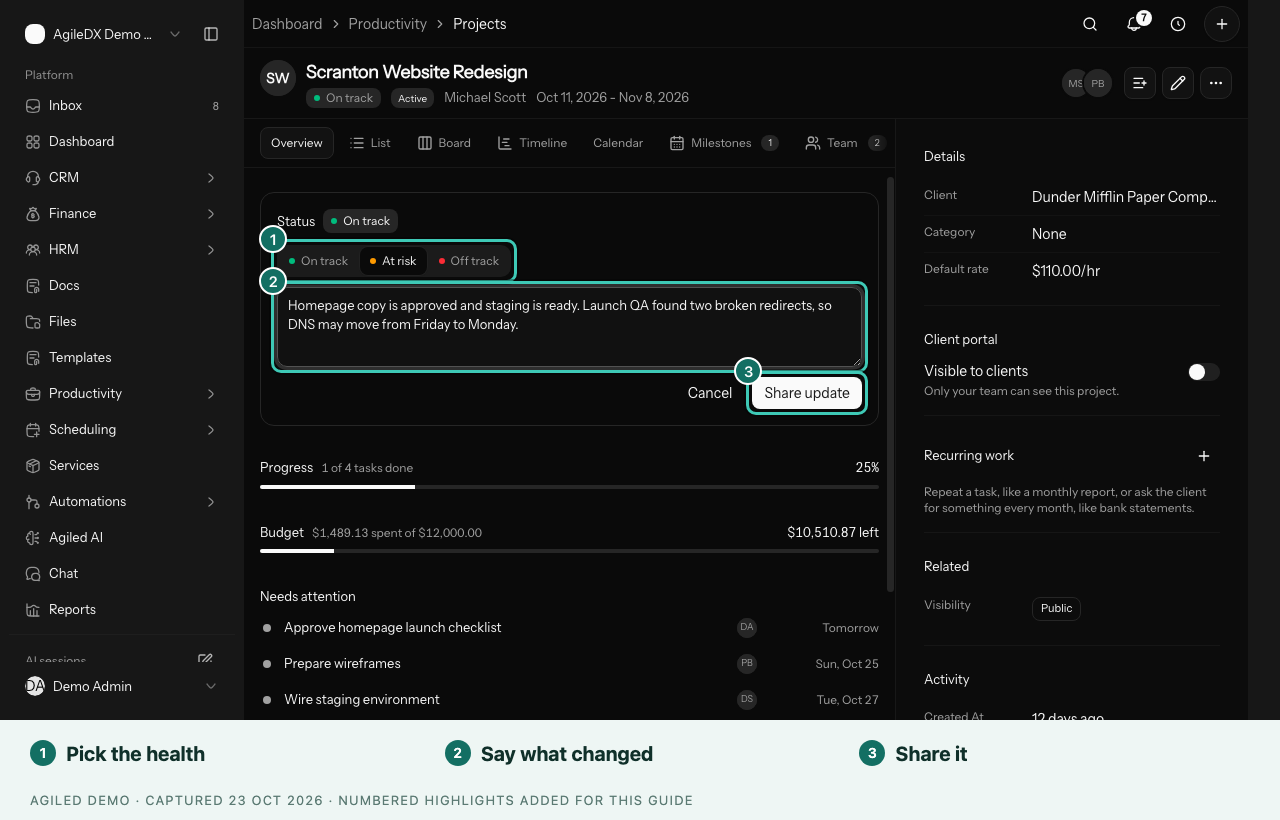
Post an Update
- Open Productivity > Projects and select a project.
- On the Overview tab, find the Status card and select Post update.
- Choose the Project health: On track, At risk or Off track.
- Under What changed, write what moved, what is next and anything that is blocking the team.
- Select Share update. You can also press Cmd+Enter or Ctrl+Enter.
The update appears at the top of the Status card, and the health pill in the project header changes to match.
What a Good Update Says
Keep it to a few sentences:
- What moved: "The client approved the homepage copy."
- What is next: "Staging QA this week, launch on Friday."
- What is blocking: "Two redirects are broken, so launch may move to Monday."
Choose At risk when a date or budget might slip and Off track when it already has. Being honest early gives the team time to fix it.
Earlier Updates
Older updates are collected under earlier updates in the Status card, so the project keeps a simple history. To remove an update you posted by mistake, select Delete update on it.
Who Can Post
Project managers, the project owner and people who can edit tasks can post updates. Everyone who can open the project can read them.
Project Status and Health
A project has two separate signals:
- Status describes the stage: Planning, Active, On Hold, Completed or Cancelled. Change it with Edit project.
- Health comes from the latest status update and says whether the work is on track.
Related Docs
Manage a Project Detail Page
Use a project's tabs and Details panel for status updates, tasks, milestones, team, money, files, client sharing and recurring work.
Track Time and Billing on a Project
Use a project's Money tab to see time logged, what is ready to bill, invoices, expenses, budget and profit.